Answering the common buyer question: for hobbyists and small shops seeking high-precision laser cutting and engraving, these five machines offer reliable performance across wood, acrylic, leather, glass, and more. Each model targets slightly different needs—from beginner-friendly kits to larger work areas for mini production. The table below compares core specs and ideal use cases to help you decide quickly.
| Product | Best For | Key Benefit | Approximate Working Area |
|---|---|---|---|
| BlazeX M3 10W Laser Engraver | Beginners and hobbyists | Ultra-precision 0.01 mm engraving with enclosure | Various sizes (enclosure included) |
| Creality Falcon 5W | Small studios and professionals seeking speed | Fast engraving up to 10,000 mm/min with large area | 400 × 415 mm |
| Artilume U1 | DIY makers and small business pilots | LightBurn compatibility with WiFi and app support | 200 × 150 mm |
| Longer Ray5 10W | Multi-machine setups and batches | High-speed, dual-beam precision and offline/app controls | 400 × 400 mm |
| Twotrees TTS-55 Pro | Hobbyists ready for robust performance | Air-assisted, high-precision 0.06 mm spot | 300 × 300 mm |
BlazeX M3 10W Laser Engraver

The BlazeX M3 combines a high-precision 10W laser with 0.01 mm accuracy, making it suitable for detailed work on wood, leather, glass, and coated metals. It is described as a 2-in-1 cutter and engraver, enabling both intricate engravings and clean cuts. The included enclosure, honeycomb bed, and starter materials support beginner projects and safety. This model is best for hobbyists who want immediate hands-on results and a compact setup for desktop use. A potential limitation is its integration scope with larger, industrial workflows; it remains ideal for personal projects and small-batch runs.
- Best for: Beginners and makers focusing on detailed engravings and small cuts.
- Why selected: High precision in a compact package with an all-in-one starter kit.
- Caution: Enclosure size may limit oversize projects; plan material dimensions accordingly.
Creality Falcon 5W Laser Engraver

The Creality Falcon offers a 5W laser with a tight 0.06 × 0.06 mm compression spot, delivering precise results within 0.004 inches and a repositioning tolerance under 0.007 inches. With a fast engraving speed up to 10,000 mm/min and a large working area of 400 × 415 mm, this model suits users who need higher throughput on slightly larger pieces. Optional upgrades (like a rotary roller) expand capabilities for cylindrical objects. It’s a strong choice for small studios or professionals who prioritize speed and a larger single-pass footprint.
- Best for: Small studios that need fast, precise work on moderately large pieces.
- Why selected: Strong balance of accuracy, speed, and a roomy work area.
- Caution: Higher-speed operation may require stable ventilation and careful material selection.
Artilume U1 Laser Engraver

The Artilume U1 emphasizes beginner-friendly setup with pre-assembly and an included education-friendly software ecosystem (CutLabX, LightBurn, LaserGRBL). It supports 0.01 mm precision at speeds up to 7000 mm/min and can cut and engrave on wood, metal-coated surfaces, plastic, leather, and more. A WiFi/app control flow is highlighted for convenience, appealing to users who want remote operation. A potential trade-off is its smaller work area of 200 × 150 mm, which suits smaller projects or prototype work better than large-scale production.
- Best for: Beginners who value app control and compatibility with popular software.
- Why selected: Strong software support and easy start-up for DIY projects.
- Caution: Limited workspace may constrain larger items or batch work.
Longer Ray5 10W Laser Engraver
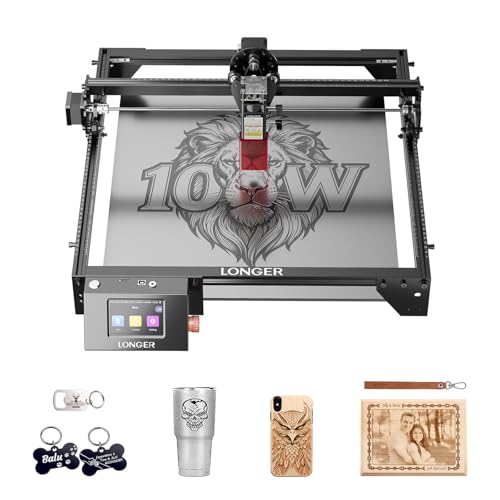
The Longer Ray5 features a 10W laser with 0.01 mm precision and a large 400 × 400 mm workspace, plus multi-machine control over ESP32 architecture. It supports USB, TF card, WiFi, and app control, aligning with both online and offline workflows. The dual-beam concept is designed to optimize speed while retaining detail, making it well-suited for studios or small businesses that may scale to multiple units. A note: as with many higher-speed devices, ventilation and material compatibility remain essential for clean results.
- Best for: Users planning a small studio setup or batch production.
- Why selected: Large work area and flexible control options support growth.
- Caution: Ensure reliable power and ventilation for sustained high-speed runs.
Twotrees TTS-55 Pro Laser Engraver

The Twotrees TTS-55 Pro emphasizes upgraded power (up to 5.5W) with air assist readiness and a 300 × 300 mm work area. Its 0.06 × 0.46 mm spot focus and LD+FAC+C-Lens compression technology support sharp engraving and clean cuts on a variety of materials including wood, leather, acrylic, and stainless steel. This model is a solid pick for hobbyists who want deeper integration with accessory setups and cleaner finishes. A limitation to consider is the smaller work area relative to some competitors, which may affect larger projects.
- Best for: Enthusiasts seeking enhanced safety features and cleaner cuts.
- Why selected: Strong engraving precision with air-assisted upgrades for deeper cuts.
- Caution: Smaller footprint may require multiple passes for larger items.
Buying Guide
What should you check first when buying a precision laser cutting machine?
Working area size, laser power, and precision (spot size and repeatability) determine what projects you can complete in one pass. Consider whether you need offline operation, software compatibility, and enclosure for safety, especially in home or shared spaces.
How important is software compatibility?
Software compatibility influences your workflow. LightBurn and LaserGRBL are common choices. If you prefer a bundled ecosystem with pre-assembled units, look for options like CutLabX or integration with apps for remote control. Ease of use matters for beginners, while advanced users may prioritize custom scripting and file formats.
What about safety and enclosure?
Enclosures help control laser exposure, dust, and fumes. A honeycomb bed improves airflow and reduces burn marks on delicate materials. If you work with small children or pets nearby, prioritize Class 1 or better safety features and a sturdy enclosure.
Which machine suits a growing small business?
Machines with larger work areas, high-speed capabilities, and multi-machine control (like the Longer Ray5) support batch processing and expansions. If you anticipate scaling, plan for space, ventilation, and compatibility with automation tools.
Material compatibility and limitations
Most models engrave wood, leather, acrylic, and coated metals, with some cutting through thinner plywood or glass. Check the exact focal length, cut depth, and material thickness supported for your typical projects. A longer focal length and larger bed are advantageous for bigger parts, while finer spots benefit detailed engraving on small items.
Maintenance and support
Pre-assembled packages and official support reduce setup time. Consider whether spare parts, upgrade kits (rotary rollers, raisers), and replacement lenses are readily available. A robust user community and clear documentation help with troubleshooting and optimization.
FAQ
- What is the best laser power for beginner projects? A mid-range power (around 5W–10W) often provides a good balance of detail, speed, and versatility for beginners.
- Do these machines require ventilation? Yes. Most setups benefit from proper ventilation to handle fumes and dust, especially when cutting and engraving thicker materials.
- Can I engrave metal surfaces? Some models support engraving on coated metals or optional metal engraving interfaces; check the specific capabilities of each model.
- Is WiFi or app control necessary? Not strictly, but it improves workflow and remote monitoring for some users, especially those managing multiple pieces.
- Which machine is best for larger projects? Models with bigger working areas (e.g., 400 × 400 mm) offer better one-pass capacity for larger parts, reducing the need for tiling or multiple passes.
- Are these machines safe for beginners? Enclosures, safety interlocks, and Class 1 or similar classifications contribute to safer operation, particularly for home setups.