Direct answer: For industrial-minded buyers seeking high precision, fast turnaround, and robust build quality, the Heygears Reflex RS Turbo, ELEGOO Saturn 4 Ultra 16K, Anycubic Photon P1 (14K), UniFormation GK3 Ultra, and Anycubic Photon Mono 4 offer strong combinations of speed, stability, and large build volumes. These models are well-suited for professional prototyping, small-batch production, and design verification in engineering or manufacturing environments.
Below is a quick buying table to help compare the five top picks at a glance. Each entry includes the brand, notable strengths, build volume, and a key limitation to consider.
| Product | Best For | Build Volume | Key Consideration |
|---|---|---|---|
| Heygears Reflex RS Turbo | High-speed, high-precision parts | Compact to mid-size | Amber screen technology for contrast; auto leveling |
| ELEGOO Saturn 4 Ultra 16K | Ultra-fine details for large models | Large | AI camera for monitoring; 30 °C heating |
| ANYCUBIC Photon P1 (14K) | Pro-level details with industrial stability | Mid to large | 14K mono LCD; auto-leveling 3.0 |
| UniFormation GK3 Ultra | Very large builds and high throughput | Large | Built-in heating; auto feeding |
| ANYCUBIC Photon Mono 4 | High-precision mono-LCD printing | Mid | LighTurbo light source for detail; 70 mm/h speed |
Heygears Reflex RS Turbo Resin 3D Printer

The Heygears Reflex RS Turbo focuses on high-speed resin printing with an Amber Screen that delivers a 566:1 contrast ratio for crisper details and faster curing. It combines automated pre-processing with true one-click slicing, repairing model defects, and generating optimal supports. The Floating Screen Auto-Leveling system minimizes build deviation to about 0.15°. It also includes a real-time force-monitoring system to pause the print if resin residue is detected. Best for rapid prototyping teams and precision-focused workshop setups where downtime reduction matters.
Who it’s best for: design studios and engineering teams needing fast turnarounds with tight tolerances.
Limitation to consider: the system’s advanced monitoring and auto-setup features rely on integrated software and hardware, which may require periodic updates to stay fully aligned with resin types.
Key reasons to choose this model
- Best for high-contrast, fast-curing resins
- Better for automated pre-processing and reliability in multi-part prints
ELEGOO Saturn 4 Ultra 16K Resin 3D Printer

The Saturn 4 Ultra 16K delivers ultra-high resolution with a 16K monochrome display to produce detailed surfaces and textures. It features Smart Tank Heating to maintain resin at an optimal 30 °C, improving flow and layer adhesion. The built-in AI camera supports real-time monitoring and alerts for print events, while the time-lapse capability aids documentation. This model is well-suited for professionals needing exceptionally fine features on large prints.
Who it’s best for: industrial prototyping teams that require detailed parts and robust print monitoring.
Limitation to consider: AI detection results can vary with environmental factors and resin types, so expected performance depends on setup and materials used.
Key reasons to choose this model
- Best for ultra-fine details on large models
- Suitable for monitoring-heavy workflows
ANYCUBIC Photon P1 Resin 3D Printer (14K)

The Photon P1 with 14K resolution emphasizes exceptional repeatability and high-resolution output. It uses industrial-grade ball screws and precision guide rails to deliver stable builds with minimal wobble. The Wave Release Technology reduces demolding force, improving success rates, while LighTurbo 4.0 provides uniform illumination for detailed layers. A large enough build volume makes it a strong option for mid-to-large parts and batch production.
Who it’s best for: professional shops needing reliable, repeatable high-detail prints with straightforward maintenance.
Limitation to consider: while the system offers auto-leveling and AI-assisted checks, large, complex parts may still need careful orientation planning to maximize success rates.
UniFormation GK3 Ultra Resin 3D Printer
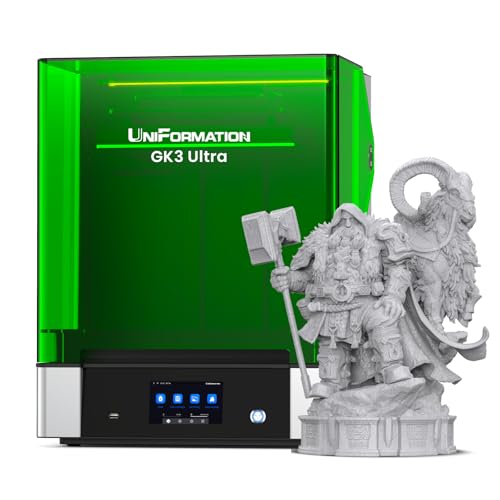
The GK3 Ultra is designed for large build volumes with a 16K LCD and a 13.5-inch footprint, enabling high-throughput printing of large models or multiple parts per job. Its Ultra-Precise and Stable Z-Axis Architecture delivers repeat positioning accuracy up to ±0.003 mm, a key metric for industrial-level consistency. The built-in heating system helps maintain print quality in varying temperatures, essential for delivering consistent results in less-controlled environments.
Who it’s best for: industrial prototyping facilities and studios handling large-scale prints or multiple parts per batch.
Limitation to consider: the added size and heater system may increase footprint and energy use, so ensure workspace suitability before purchase.
ANYCUBIC Photon P1 14K Resin 3D Printer (Auto-Leveling 3.0)

This Photon P1 model emphasizes stability with industrial ball screws and precision rails, paired with auto-leveling 3.0 and a 14K monochrome screen for sharp details. LighTurbo 4.0 ensures uniform lighting across the build area, supporting high-detail parts. The printer supports larger prints and robust build stability, making it suitable for both enthusiasts advancing to professional tasks and small studios requiring dependable results.
Who it’s best for: professionals and prosumers seeking high-detail output with dependable leveling and robust illumination.
Limitation to consider: as with other resin systems, post-processing quality and resin handling practices greatly influence final results.
Buying Guide
What matters most in industrial resin printers?
- Resolution and build precision: Look for mono LCDs, high pixel density, and stable Z-axis movement to minimize layer lines and ensure repeatability.
- Build volume and throughput: Choose a machine that matches your part size and production rate, while leaving space for post-processing.
- Resin management: Heating, resin flow, and environmental controls help reduce defects and improve consistency.
- Monitoring and automation: AI cameras, auto-leveling, and force-monitoring reduce failed prints and downtime.
- Software ecosystem: Slicing, support generation, model repair, and workflow integration should fit existing design and production pipelines.
Which features are most valuable for different buyers?
- High-speed printing: Amber or fast-resin systems with advanced exposure control are ideal for rapid iteration cycles.
- Large models or multi-part assemblies: Prioritize printers with large build volumes and reliable part alignment.
- Detail-oriented work: Look for high 14K/16K resolutions and consistent light delivery for tiny features.
What about reliability and ongoing costs?
- Keep an eye on long-term consumable costs (resin, screens, and tanks) and potential maintenance needs (electronics, heaters, motion components).
- Consider after-sales support, spare parts availability, and firmware updates as part of total cost of ownership.
FAQ
- What makes an industrial resin printer different from a consumer model?
– Industrial units typically offer larger build volumes, higher precision, improved stability, and robust monitors for continuous use in production or prototyping environments. - Is auto-leveling essential for resin printers?
– Auto-leveling helps ensure consistent layer height and reduces failed prints, especially in busy workflows where manual leveling may be impractical. - Do I need AI monitoring features?
– AI monitoring can reduce waste by alerting you to issues early, though setup and resin type can influence effectiveness. - Can these printers handle multiple resins in one job?
– Some models support multi-material or dual-color capabilities, but verify each machine’s resin compatibility and workflow compatibility before use. - What post-processing is required?
– Resin prints typically require rinsing, post-curing, and sometimes support removal, so plan space and workflow accordingly.