Industrial powered USB hubs are designed for busy workspaces that demand stable, high-current connectivity for multiple devices. This article highlights five durable, power-ready options suitable for factories, labs, POS setups, and IT rooms. Each pick is evaluated for expandability, protection, and ease of installation, helping buyers choose the right hub for their environment. The top picks vary by port count, mounting options, and protection features to fit different industrial needs.
The buyer profile for these hubs generally includes: technicians and engineers needing reliable device expansion in workshop or factory settings; IT staff managing kiosk or POS systems; and lab personnel requiring robust, mountable hubs with solid ESD protection. The table below provides a quick reference to the five selected products and their core strengths.
| Product | Best For | Key Strength | Protection/Durability |
|---|---|---|---|
| GEKRY USB 3.0 Hub, 7-Port | Small to mid-size setups needing 7 ports and BC 1.2 charging | 36W total power, 5V/900mA per port | Hot swap, plug-and-play, 1.5A on any 4 ports |
| Waveshare Industrial Grade USB HUB | Industrial environments with dual-host sharing | 4x USB 3.2 ports, dual-host switch | ESD protection on each port, over-voltage protection |
| SABRENT 10-Port USB 3.0 Hub | High-port-count needs with per-port visibility | 10 ports, individual power switches | Blue LED indicators for each port |
| Coolgear 4-Port 3.2 Gen 1 USB Hub | Compact, rugged hubs with mounting options | 5Gbps data, 2.4A per port charging | ESD surge protection, bus or self-powered |
| StarTech.com 7-Port USB 3.0 Hub | Mac/Windows laptops needing portable, durable expander | 5 Gbps, metal enclosure | Backwards compatible with USB 2.0/1.x |
GEKRY USB 3.0 7-Port Powered Hub

The GEKRY hub provides a total of 36W to power seven devices at 5V/900mA per port, with support for BC 1.2 charging and up to 1.5A on any four ports. It operates on Windows, Mac OS, and Linux without drivers, and supports USB 3.0 data transfer up to 5 Gbps while remaining backward compatible with USB 2.0/1.1 devices. This hub is best for users who need strong pooled power for multiple peripherals while keeping data bandwidth high. A limitation is that high-power devices on all ports simultaneously may reduce performance on individual ports if many devices approach the 900mA per-port limit.
Best for: small to mid-size workstations needing seven powered ports with straightforward setup. Choose this if you want plug-and-play operation and strong per-port power with broad OS compatibility.
Waveshare Industrial Grade USB HUB

This Waveshare hub focuses on industrial reliability with four extended USB 3.2 ports and switchable dual host inputs. It supports stable, concurrent connections across four devices and includes ESD protection on each port along with over-voltage protection to guard connected equipment. It’s suited for environments needing shared USB resources between two hosts, such as a control PC and a maintenance station. A potential drawback is the fixed 4-port configuration, which may require additional hubs for extra devices.
Best for: environments needing dual-host sharing and robust port protection for multiple devices. Consider this if you operate two control systems sharing peripherals.
SABRENT 10-Port USB 3.0 Hub

The SABRENT hub offers ten USB 3.0 ports with data transfer speeds up to 5 Gbps and individual power switches, each with blue LEDs to indicate status. This design is ideal for setups requiring clear port-level control and quick visual status checks. It ships with a 60W power adapter, enabling simultaneous operation of many peripherals. A limitation is that these per-port switches and indicators may require extra space and management on crowded desk setups.
Best for: high-port-count installations where per-port power control and visibility matter. Choose this if you need straightforward monitoring of port activity.
Coolgear 4-Port Gen 1 USB Hub

The Coolgear hub features 4 USB 3.2 Gen 1 ports with up to 5Gbps transfer rates and 2.4A charging per port, or 900mA per port when bus-powered. It has a rugged metal housing and 15KV ESD surge protection per port, making it suitable for harsh environments such as workshops or labs. The device can be bus-powered or self-powered, offering flexible deployment. A consideration is that only four ports limit expansion compared to higher-port-count models.
Best for: compact, rugged installations requiring strong data speed and individual port protection. Choose this if you value metal housing, ESD protection, and mounting options in a small footprint.
Kingwin Industrial USB 3.0 Hub 10-Port

The Kingwin 10-port hub adds a heavy-duty metal enclosure with mounting brackets for stable, 24/7 operation. It’s designed for industrial uses such as POS systems, factory automation, and server rooms, offering a robust expansion solution with reliability in demanding environments. The kit includes mounting hardware to secure the hub in place. A possible limitation is that some setups may require additional cable management to maintain a clean installation in dense cabinet spaces.
Best for: large-scale industrial installations needing 10 high-speed ports with a durable, mountable design. Choose this if you require long-term reliability in harsh environments.
StarTech 10-Port Industrial USB 2.0 Hub
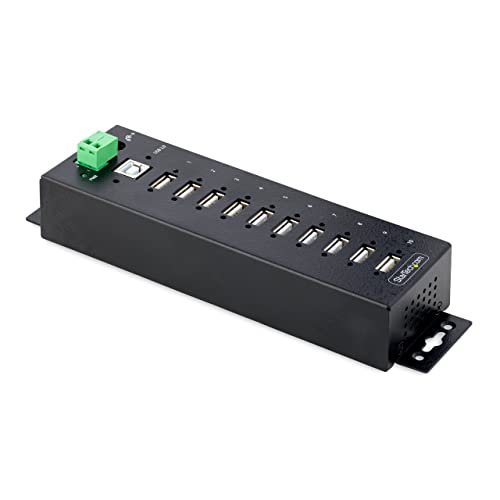
This StarTech 10-port hub uses a rugged steel enclosure with Level 4 ESD protection and locking USB-A ports to prevent accidental disconnections. It offers 5V up to 0.5A per port, suitable for many USB peripherals. It is designed for DIN rail or wall/d desk mounting, which makes it adaptable for fixed installations. The USB 2.0 base bandwidth (480 Mbps) is lower than USB 3.x hubs, so data-heavy tasks may run slower than with newer standards.
StarTech 7 Port USB 3.0 Hub

This StarTech model delivers seven USB 3.0 ports with a durable metal enclosure for desktop or wall mounting. It supports speeds up to 5 Gbps while remaining backward compatible with USB 2.0 devices. The hub is designed for rugged daily use and aims to be a reliable power-expansion solution for laptops or desktops in professional settings. A potential limitation is fewer ports compared to larger hubs, which may require additional hubs for very large device fleets.
Buying Guide: Key Purchase Considerations
Power delivery: Look for a hub with a clear total wattage and per-port current rating to ensure all devices receive adequate power. If you have high-power peripherals, prioritize higher per-port current or a self-powered design.
Port count and expansion needs: Match the number of ports to your expected devices. Consider future growth when selecting between 4-port, 7-port, or 10-port hubs.
Protection features: Industrial environments benefit from ESD protection (Level 4 or equivalent), over-voltage protection, and surge protection per port to prevent damage from electrical spikes.
Durability and mounting: Metal enclosures, rugged housings, and mounting options (wall, DIN rail, desk) improve reliability in harsh environments. Check for included mounting hardware if you need it.
Connectivity and speed: USB 3.0/3.2 hubs offer up to 5 Gbps data transfer. If you work with older equipment, USB 2.0 compatibility remains important, but you may miss the fastest speeds on newer devices.
Compatibility and ease of use: Look for plug-and-play operation and broad OS compatibility. No driver requirements can simplify deployment across mixed systems.
Cost versus value: Compare total port count, protection features, and build quality against the expected lifetime workload to determine true value for your environment.
FAQ
- What is the main difference between powered and bus-powered USB hubs? A powered hub uses an external power supply to deliver power to all ports, enabling reliable operation for power-hungry devices. A bus-powered hub draws power from the computer’s USB port, which can limit device support and performance if many devices are connected.
- Are industrial USB hubs durable for harsh environments? Yes, many industrial hubs use metal enclosures and include ESD protection, mounting options, and locking connectors to withstand tough conditions.
- Can USB hubs provide enough power for high-draw peripherals? It depends on the hub’s total wattage and per-port current. Check the combined power rating and per-port current to ensure all devices operate reliably.
- Do hubs support multiple hosts or switching between devices? Some models, like dual-host hubs, support switching between hosts. If you need this capability, verify dual-host support before purchasing.
- Is USB 3.0 sufficient for most peripherals? For most high-speed peripherals, yes, but USB 3.2 or higher provides greater bandwidth for data-heavy tasks.
- Do these hubs require drivers? Most industrial hubs listed here are plug-and-play and do not require drivers, simplifying deployment across mixed systems.