When selecting an industrial panel mount monitor, look for rugged construction, IP ratings, and reliable touch or display technology that suits harsh environments. This guide focuses on five durable options that excel in kiosks, POS, automation, and control rooms. Best for: operators needing rugged open-frame or embedded displays, front IP protection, and multi-touch input for public or high-traffic settings.
| Product | Display Type | Best For |
|---|---|---|
| RIUIIN 18.5″ Industrial Touch Monitor | Open-frame panel with 18.5″ display | Kiosk and automation enclosures requiring VESA mounting |
| RIUIIN 15.6″ Open Frame Touchscreen | PCAP 10-point touch, 15.6″ | Kiosk, POS, and digital signage in rugged areas |
| GreenTouch 10.1″ Embedded Interactive | 10.1″ touchscreen with IP65 front | Small-form kiosks and POS in dirty or dusty conditions |
| RIUIIN 8″ Open Frame Capacitive Touch | 8″ PCAP touchscreen | Compact control panels and automation panels |
| 19″ Industrial PC Monitor (Holland Computers) | 19″ LED monitor for panel mounting | Industrial PC setups and kiosk systems |
Notes: All selections emphasize panel-mount capability, robust touch or display tech, and suitability for industrial or commercial environments. Each product listing below includes who the monitor is best for and why it was chosen, plus practical cautions where relevant.
RIUIIN 18.5 Inch Industrial Touch Monitor

Display: 18.5″ open-frame panel with front VESA mounting. Touch: 10-point PCAP capability for smooth, accurate input. Durability: rugged construction with modular mounting compatibility suitable for kiosks and automated systems.
Who it’s for: Ideal for large public kiosks, factory control stations, and vending environments needing a robust touch interface and straightforward mounting. Why: Combines open-frame mounting with front-access hardware and reliable touch response in a compact footprint.
Caution: Open-frame designs may require additional protective bezel or enclosure in extremely dusty or high-dust environments to protect cable terminations.
RIUIIN 15.6 Inch Open Frame Touchscreen

Display: 15.6″ Full HD with 1920×1080 resolution. Touch: 10-point PCAP with responsive multi-touch. Durability: IK09-rated rugged build with IP65 front protection in the front panel design.
Who it’s for: Suitable for compact industrial panels, ATMs, or POS stations where a larger display is unnecessary but touch capability is essential. Why: Balances a moderate screen size with strong touch durability and front protection against dust and moisture.
Caution: Open-frame assemblies may need careful edge finishing to avoid sharp corners on mounted panels.
GreenTouch 10.1 Inch Embedded Interactive Monitor
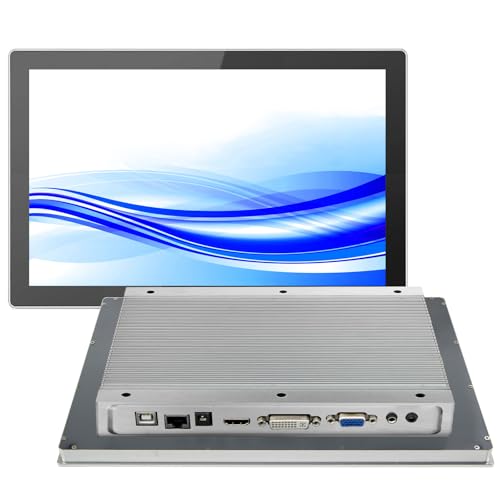
Display: 10.1″ embedded touchscreen with front IP65 waterproofing. Touch: Multi-touch with PCAP, supporting multiple touch points. Interfaces: HDMI, VGA, DVI, and audio for flexible connectivity.
Who it’s for: Best for compact control panels, kiosks, or machine HMI displays in dusty or damp locations. Why: Front IP65 protection and a compact footprint support durable public interfaces.
Caution: Smaller screen size may limit detailed data display for some applications; ensure legibility at expected viewing distance.
RIUIIN 8 Inch Open Frame Capacitive Touchscreen

Display: 8″ compact panel with 1024×768 resolution. Touch: G+G 10-point capacitive touch with high sensitivity. Durability: IK09 impact resistance and IP65 front protection for exposed environments.
Who it’s for: Perfect for small control panels, vending machines, or portable kiosks in areas with potential contact and liquid exposure. Why: Combines a small footprint with rugged front protection and reliable touch performance.
Caution: Small screens can be challenging for detailed operational data; consider a larger panel if complex visualization is required.
19 Inch Industrial PC Monitor (Holland Computers)

Display: 19″ LED monitor designed for panel mounting in industrial settings. Use: Suited for PC-based panel installations and kiosk systems requiring a larger, readable screen.
Who it’s for: Best for control rooms, operator desks, or manufacturing lines where a standard PC monitor size is preferred and mounting is a priority. Why: Large display size with straightforward panel-mount compatibility for easy integration.
Caution: Availability and compatibility with specific industrial controllers or software should be confirmed before integration.
Buying Guide
What to consider when choosing an industrial panel mount monitor:
- Panel type and size: Select an open-frame, embedded, or standard panel based on enclosure architecture and space constraints. Larger screens improve readability, while compact models fit tight panels.
- Touch technology: If touch is needed, choose PCAP multi-touch for most environments. Consider USB or USB-C connectivity and driver support.
- Durability and protection: IP ratings protect against dust and water; IK ratings indicate impact resistance. Front protection is crucial in dusty or oily workplaces.
- Mounting compatibility: Ensure VESA patterns match your enclosure or stand. Open-frame monitors may require edge finishing or brackets for secure mounting.
- Connectivity: Check for HDMI, VGA, DVI, and audio options to ensure compatibility with your existing hardware. Consider additional ports for peripherals.
- Operating environment: Temperature, humidity, and potential exposure to chemicals or liquids influence enclosure choice and materials.
- Maintenance and lifecycle: Look for products with a stable supply chain and serviceable components for long-term installations.
Frequently Asked Questions
- What is a panel-mount monitor?
Answer: A monitor designed to be mounted within a protected panel or enclosure, often used in industrial control rooms or kiosks. - Do these monitors support touch input?
Answer: Several selections include multi-touch PCAP touch, typically requiring a USB connection for the touch interface. - Are IP65 protections important for industrial displays?
Answer: Yes; IP65 front protection helps prevent ingress of dust and water, extending display life in harsh environments. - Can I mount these monitors in existing enclosures?
Answer: Most are designed for VESA mounting; verify panel size, mounting holes, and enclosure dimensions before purchasing. - What screen size should I choose for a control panel?
Answer: Choose based on operator viewing distance and data complexity; larger screens improve readability in busy control rooms. - Are these monitors suitable for outdoor use?
Answer: Front IP65 protection helps against dust and water, but check temperature ratings and enclosure sealing for outdoor deployments.