High-volume production printers are built for busy environments that demand fast, reliable output with minimal downtime. This guide focuses on printers that excel in large print runs, durable builds, and features that support day-to-day office workflows. The top picks below are suited for small to mid-sized teams needing steady monochrome and color performance, secure networking, and scalable paper handling. Each option includes who it’s best for, plus clear pros and potential limits to help you decide between speed, capacity, and total cost of ownership.
| Product | Best For | Key Benefit |
|---|---|---|
| HP Smart Tank 5000 | Home offices with frequent document printing | Cartridge-free, years of ink included |
| Brother HL-6210DW | Medium to large workgroups needing fast monochrome output | High print speed up to 50 ppm |
| Brother DCP-L2640DW | Small offices needing all-in-one colorless output | Compact 3-in-1 with fast scanning and duplex |
| Epson Workforce Pro WF-4820 | High-volume color document printing | High-speed color printing and professional-quality output |
| Brother MFC-L5915DW | Busy offices needing fast mono print, scan, and copy | Very fast 50 ppm, strong scanning |
HP Smart Tank 5000 Wireless All-in-One

Best for home offices needing cartridge-free printing with long-lasting ink. This HP model includes up to two years of ink, reducing refill frequency and maintenance time. It combines printing, scanning, and copying with AI-enabled features for smart operation. Suitable for households or small teams that prioritize running costs and simple setup.
Who it’s best for: small teams and home offices that print frequently and want low ongoing ink costs. Why selected: the long-lasting ink supply and refillable design minimize interruptions during larger print runs. Limitation: performance may lag behind high-end business monochrome laser printers on speed for very large jobs.
Brother HL-6210DW Professional Laser Printer

Best for mid-to-large offices needing very fast monochrome printing. This laser printer handles high-volume tasks with a 50 ppm output speed and supports large capacity paper handling when paired with optional trays. It’s well-suited for finance, legal, and admin departments that rely on quick black-and-white document production.
Who it’s best for: organizations prioritizing speed and reliability in monochrome workloads. Why selected: a robust engine designed for continuous printing. Limitation: single-color output limits use cases that require color documents.
Brother DCP-L2640DW Wireless Compact MFP

Best for small offices needing a compact all-in-one. This monochrome laser printer includes copying and scanning with duplex printing, plus wireless and Ethernet options for flexible office networking. It’s a good fit for shared workspaces with space constraints.
Who it’s best for: compact offices or home offices requiring an affordable, multi-function monochrome device. Why selected: strong all-in-one features in a small footprint. Caution: color printing is not available, which limits some document types.
Epson Workforce Pro WF-4820
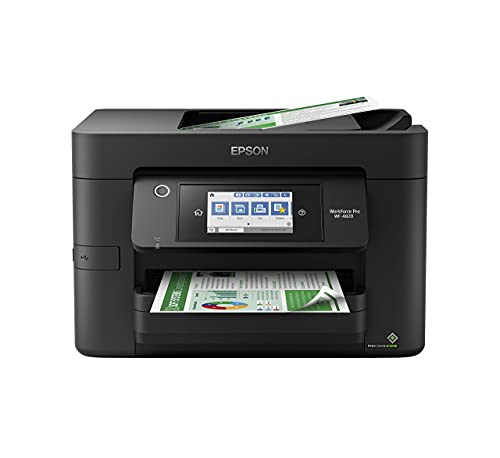
Best for color-heavy workloads with high-speed needs. This inkjet all-in-one leverages PrecisionCore Heat-Free technology for fast output and sharp color accuracy. It’s designed for high-volume environments that require durable color documents and proofs.
Who it’s best for: teams needing fast, vibrant color documents with reliable uptime. Why selected: high-volume reliability and quality color printing. Limitation: inkjet systems may require more frequent maintenance in very large print runs compared with some lasers.
Brother MFC-L5915DW All-In-One

Best for busy offices needing fast mono print, scan, and copy with robust security features. This 50 ppm laser AIO includes a high-speed scanner and dual-band WiFi for easy network integration in larger teams that share devices.
Who it’s best for: medium-to-large workgroups seeking high-speed mono output and efficient document workflows. Why selected: superior print speed and strong scanning capabilities. Limitation: color options are not available in this model.
Buying Guide
What matters most for high-volume printing?
Consider monthly duty cycle, pages per minute, and total cost of ownership. For monochrome-heavy offices, laser printers often deliver lower per-page costs and faster output. For frequent color or mixed documents, color inkjet or color laser options can be preferable, depending on volume and page types.
Paper handling and expansion
Look for high-capacity trays, automatic duplexing, and optional feeder options. The ability to scale paper storage minimizes interruptions during long print runs. If you expect growth, choose models that support additional trays without replacing the base unit.
Connectivity and security
Ensure multi-user network access with Ethernet or robust wireless capabilities. Features like secure print, user authentication, and firmware updates help protect sensitive documents in shared environments.
Maintenance and ink/tone costs
Cartridge-free or high-yield toner options reduce ongoing maintenance. For inkjet systems, check for reliability of refills or remanufactured cartridges. Low maintenance hardware minimizes downtime during busy weeks.
Size, footprint, and deployment
Evaluate the printer’s footprint relative to your space. In open-plan offices, smaller multi-function devices can fit more easily while still delivering required performance. For dedicated print rooms, larger, faster units may be appropriate.
Which model should you choose?
- Best for cost-conscious, high-volume black-and-white printing: Brother HL-6210DW or Brother MFC-L5915DW.
- Best for all-in-one versatility with long-run ink in a home office: HP Smart Tank 5000.
- Best for color-heavy environments needing fast color output: Epson Workforce Pro WF-4820.
- Best for compact spaces requiring multi-function capabilities: Brother DCP-L2640DW.
FAQ
- What’s the fastest printer for high-volume monochrome jobs? Answer: Laser printers like the Brother HL-6210DW and MFC-L5915DW offer high page-per-minute speeds and strong reliability for large runs.
- Are ink-tank printers better for high-volume use? Answer: Ink-tank models can provide very low running costs for frequent color or photo-heavy documents, but laser may win on speed and durability for text-heavy tasks.
- Is color printing worth it for a production environment? Answer: Consider the mix of documents; if most pages are color, a robust color inkjet or color laser may be advantageous. If mostly black-and-white, focus on mono performance.
- Do these printers support network sharing? Answer: Yes, most listed models offer Ethernet and wireless networking suitable for shared offices.
- What about maintenance costs? Answer: Consider high-yield toners or long-ink-life cartridges and the availability of replacement supplies in your area to estimate ongoing costs.
- Which model offers the best balance of size and capacity? Answer: The DCP-L2640DW provides a compact footprint with strong all-in-one functions, ideal for small offices with space constraints.