Direct answer: For heavy daily use, choose shredders with large auto-feed capacity, long continuous run times, and secure micro-cut or P-4 cross-cut outputs. The top picks below are suited for small offices, bookkeeping desks, or busy workspaces that need reliable, high-capacity destruction without frequent interruptions. Each product is explained with ideal user profiles and practical trade-offs.
The following table summarizes five strong options. Use this as a quick-reference guide to compare auto-feed capacity, run time, security level, and bin size.
| Product | ||||
|---|---|---|---|---|
| Trishintage Heavy Duty Paper Shredder | 400 | 30 min auto / unspecified manual | P5 Micro-Cut | Large (bin details not specified) |
| BONSEN 300-Sheet Auto Feed | 300 | 60 min auto / 30 min manual | P-4 Cross-Cut | 8.1 gallon |
| Bonsaii 200-Sheet Auto Feed | 200 | 60 min auto / 30 min manual | P-4 Micro-Cut | 8.1 gallons |
| BONSEN 24-Sheet Cross-Cut | 24 | 40 min | P-4 Cross-Cut | 9 gallons |
| Aurora Commercial Grade 200-Sheet Auto Feed | 200 | 60 min nonstop | P-5 Micro-Cut | Not specified |
Trishintage Heavy Duty Paper Shredder

The Trishintage model handles up to 400 sheets in auto feed, making it well-suited for small offices or professional environments that process large volumes of documents. It uses a P5 micro-cut design to produce very small particles, which is ideal for highly confidential materials. Best for office finance or healthcare settings needing frequent secure disposal.
Best for: high-volume desks or departments that require rapid batch shredding with strong data security. Limitations: runtime is not specified for manual-only tasks, and noise levels are not listed, which may matter in quieter workspaces.
BONSEN 300-Sheet Auto Feed Shredder

This heavy-duty shredder combines auto feed for up to 300 sheets with a manual slot for 12 sheets, cards, staples, and clips. It runs up to 60 minutes in auto mode and 30 minutes manually, thanks to an advanced cooling system. Best for large office tasks, bulk document destruction, and environments where hands-free shredding reduces labor time.
Best for: teams needing long, uninterrupted shredding cycles. Caution: cross-check noise output at high loads, as exact decibel level beyond “super quiet” is not specified in the data.
Bonsaii 200-Sheet Auto Feed Shredder

With 200-sheet auto-feed capability and a robust 8.1-gallon bin, this Bonsaii model emphasizes steady performance for mid-to-large offices. The device supports 12-sheet manual shredding for occasional needs and includes wheels for mobility. It uses P-4 security and offers non-stop operation for up to 60 minutes in auto mode.
Best for: offices needing a balance of high-volume auto shredding and simple mobility. Limitation: slightly smaller auto-feed capacity than the 300-sheet options, which could impact very large batches.
BONSEN 24-Sheet Cross-Cut Shredder
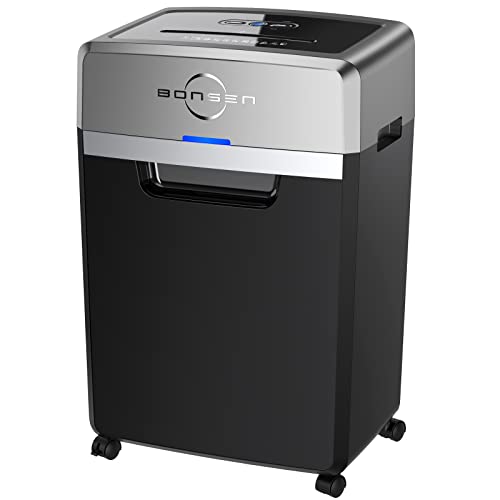
Although it shreds a smaller batch (24 sheets), this unit uses a 9-gallon bin and a cross-cut output at 5/32 by 1-12/32 inches, meeting P-4 security requirements. It is useful for smaller teams or supplemental shredding tasks where a secondary device is needed for shorter, secure shredding runs.
Best for: occasional large tasks or secondary shredder needs. Limitation: lower auto-feed capacity means more manual intervention during big jobs.
Aurora Commercial Grade 200-Sheet Auto Feed
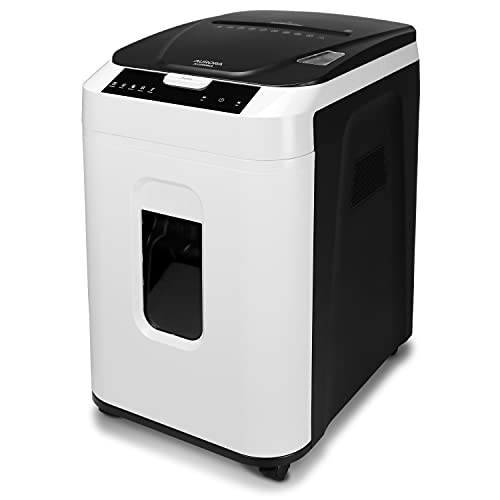
Aurora’s heavy-duty machine provides 200-sheet auto-feed with a 60-minute nonstop runtime and P-5 micro-cut security. The shredder’s micro-cut output yields tiny particles, maximizing data protection. It also features anti-jam auto-reverse and quiet operation for office environments that require discretion and efficiency.
Best for: offices prioritizing maximum data security with long, uninterrupted shredding runs. Caution: some users may require additional post-shred bin management depending on workload, as bin capacity is not specified in the summary data.
Buying Guide
What to consider when selecting a heavy-duty shredder
- Shred capacity and run time: Prioritize models offering 60-minute auto-run or more for bulk tasks. Consider whether you need constant auto-feed or a mix with manual feeding.
- Security level: P-4 micro-cut or P-5 micro-cut provide higher confidentiality. Choose based on the sensitivity of your documents.
- Bin size and mobility: Large bins reduce emptying frequency. Wheels or casters help move the shredder within the office.
- Noise and cooling: Look for models with dual cooling or stated quiet operation for open-plan offices.
- Versatility: Some units accept credit cards, staples, and CDs/DVDs. If you shred varied media, a model with manual and auto capacities is advantageous.
- Maintenance: Check for jam-prevention features, auto-reverse, and straightforward bin emptying to minimize downtime.
What scenario fits which shredder?
- Best for high-volume finance or legal departments: Trishintage or Aurora with high auto-feed capacities and P-5 micro-cut security.
- Best for mixed-office use with budget considerations: Bonsaii 200-Sheet Auto Feed or BONSEN 300-Sheet Auto Feed for steady performance and solid security.
- Better for secondary tasking in a busy office: BONSEN 24-Sheet Cross-Cut offers flexibility without occupying a large footprint.
What questions should you ask before buying?
- What is the typical daily volume of documents to shred?
- Do you require cross-cut or micro-cut output for data security?
- Is auto-feed a must-have, or is manual shredding acceptable for most tasks?
- How important is bin capacity and ease of disposal?
- Are there noise or space constraints in the shredding area?
FAQ
- Q: What security level is safest for sensitive documents? A: Micro-cut (P-4 or P-5) offers smaller particle sizes and higher protection.
- Q: How long can these shredders run continuously? A: Many models offer 30–60 minutes auto-run with cooldown periods; check each model’s specs.
- Q: Can shredders handle CDs or cards? A: Some models support CDs, staples, and credit cards via manual feed; verify per model.
- Q: Is auto-feed worth it for small offices? A: Yes, it reduces manual handling and speeds up batch disposal, especially with high-capacity trays.
- Q: Do I need a shredder with wheels? A: Wheels improve mobility between desks or rooms, especially for shared devices.
- Q: How often should I empty the bin? A: Empty based on bin fullness indicators or frequency of shredding volume to prevent jams and overflow.