Answering your search for a reliable CO2 laser cutting machine, these five models balance power, usability, and versatility for hobbyists, small businesses, and makers. The list highlights who benefits most from each option, such as beginners seeking safety features, professionals needing high speed, or those engraving larger projects. Below is a concise buying guide and a quick comparison to help you pick the right CO2 laser cutter and engraver for your needs.
| Product | Recommended For | Bed Size | Power (Approx.) |
|---|---|---|---|
| xTool P2S 55W CO2 Laser Cutter | Advanced hobbyists and small studios | 26″ x 14″ | 55W |
| OMTech 60W CO2 Laser Engraver | Small businesses needing reliable software flow | 20″ x 28″ | 60W |
| SHENGJINSH 80W CO2 Laser Engraver | High-output engraving and cutting | 20″ x 28″ | 80W |
| VEVOR 100W CO2 Laser Engraver | Heavy-duty projects and batch production | 24″ x 35″ | 100W |
| ACMER S2 Laser Engraver (72W total) | Precise detail on wood, acrylic, leather | 300 x 300 mm | 12W laser head, 72W total system |
Note: All models support various materials and software ecosystems; however, performance varies with material type, thickness, and focal setup. Consider enclosure safety, air assist, software compatibility, and service availability when choosing.
xTool P2S 55W CO2 Laser Cutter

Best for advanced hobbyists and design studios seeking high-speed engraving and robust airflow. The P2S offers stronger exhaust with dual air pumps and dual 16MP cameras for real-time previews. It features a 26″ x 14″ bed, auto-passthrough for long materials, and 3D curved engraving for cylindrical objects. The LiDAR autofocus ensures precise focus, reducing setup time and errors. This model pairs well with serial-number engraving and multi-design batches in one session. Caution: Requires adequate workspace and reliable ventilation for optimal operation.
OMTech 60W CO2 Laser Engraver

Best for small businesses needing reliable software control and long-term performance. This bundle includes a water chiller and LightBurn software for intuitive operation. Autofocus minimizes manual adjustments, and a 20″x28″ bed supports a wide range of projects. Four-way pass-through doors enable larger items, while the automated focus helps keep throughput steady. Choose this if you want a turnkey setup with compatible software and straightforward maintenance. Limitation: Larger items may require careful alignment with the pass-through doors during setup.
SHENGJINSH 80W CO2 Laser Engraver
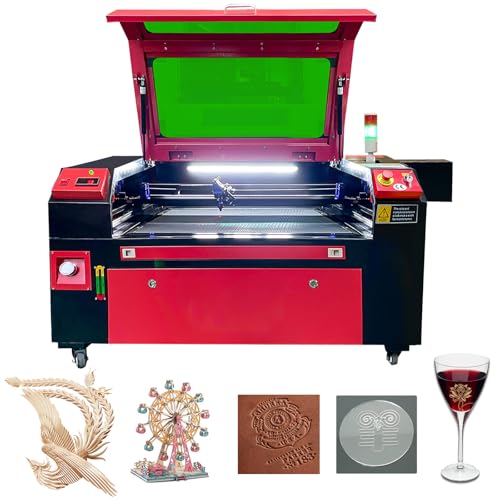
Best for high-output projects that demand faster cutting on wood, acrylic, and leather. The 80W system features a built-in 6L water tank, two-way pass-through doors, and a motorized bed enabling variable thickness focusing. The digital control panel supports CorelDRAW, LightBurn, AutoCAD, and more. This model suits labs or makerspaces needing sizable work areas and strong performance. Caution: Data shows significant weight and footprint; ensure solid lab or workshop support and ventilation.
VEVOR 100W CO2 Laser Engraver

Best for heavy-duty production and large-format projects. The 24″ x 35″ bed with a 100W CO2 laser enables fast cutting on thick materials like wood and acrylic. It includes two-way pass-through and a digital control panel compatible with LightBurn, CorelDRAW, and AutoCAD. This option suits users who need a spacious workspace and high throughput. Limitation: Higher power demands more robust ventilation and electrical setup; verify shop readiness before purchasing.
ACMER S2 Laser Engraver (12W Head, 72W Total)

Best for beginners and small businesses needing precise detail on wood, acrylic, leather, and coated metals. The S2 combines a true 12W laser head with a 72W total system, offering 0.01 mm engraving accuracy and a 300 x 300 mm workspace. It supports high-speed engraving up to 10,000 mm/min and optional rotary modules for cylindrical objects. Choose this if you want a budget-friendly entry with scalable options. Limitation: The 300 x 300 mm area may constrain very large panels without tiling designs.
Buying Guide
- Material compatibility: Ensure the machine can cut and engrave your primary materials (wood, acrylic, leather, fabric, glass, metal-coated options).
- Work area vs. footprint: Larger beds enable bigger projects but require more space and ventilation.
- Power and speed: Higher wattage drives deeper cuts and faster engraving but may demand more service and maintenance.
- Software and workflow: Check compatibility with LightBurn, CorelDRAW, AutoCAD, and your preferred design tools.
- Air and cooling: Air assist and water cooling improve cut quality and prolong laser life; verify included accessories.
- Safety and enclosure: Enclosures reduce exposure to fumes and stray beams; ensure proper safety features and user guidance.
- Maintenance and service: Look for accessible spares, online resources, and warranty options in your region.
- Expansion options: Rotary axes, risers, and pass-through features add versatility for cylindrical items and long objects.
FAQ
- What is a CO2 laser cutter and engraver best used for?
CO2 laser machines are versatile for cutting and engraving non-metal materials like wood, acrylic, fabric, leather, and coated metals. They are common in hobby workshops and small businesses for signage, crafts, and prototyping.
- Do I need a ventilation system with a CO2 laser?
Yes. Adequate ventilation or an exhaust system is essential to remove fumes and smoke and to maintain air quality in your workspace.
- Is a larger bed always better?
Not necessarily. A larger bed enables bigger projects but increases machine size, cost, and space requirements. Choose based on typical project dimensions.
- Can I use CO2 lasers for metals?
CO2 lasers can engrave metal-coated surfaces but cutting bare metal often requires metal-specific lasers or finishing processes. Check material compatibility for each model.
- What software should I learn for these machines?
Common options include LightBurn, CorelDRAW, and AutoCAD. Compatibility varies by model, so confirm supported software before purchase.
- Is a rotary accessory important?
rotary modules enable engraving on cylindrical items like tumblers and bottles. If you work with cylindrical objects, consider models that support a rotary kit.