Looking for a reliable 100W fiber laser engraver for metal marking, deep engraving, or complex designs? This guide highlights five solid options, each with a 100W JPT MOPA or equivalent source, suitable for metal work, jewelry, and small batch production. The selections target buyers who need strong speed, precise galvanometer control, and compatibility with LightBurn or EZCAD workflows. The top picks vary in features such as rotary axes, lens options, and tower height, so you can match your workflow to the right machine.
Buyer types:
– Small business owners needing fast, repeatable marks on metal and jewelry.
– Hobbyists seeking professional-grade engraving with dependable autofocus.
– Shops that require rotary engraving on cylindrical items and easy software integration.
The following table compares the key attributes for quick scanning.
| Product | Best For | Key Features |
|---|---|---|
| Ovsuqu 100W Fiber Laser Engraver | Deep engraving on metal, bulk jobs | JPT MOPA M7 source, 1-4000 kHz, 2-500 ns, 300×300 mm, 80D rotary axis, Lightburn compatible |
| AchiPrin 100W JPT E2 MOPA | Large surface marking and cylindrical items | 175 mm and 300 mm field lenses, D80 rotary, up to 6000 mm/s, Lightburn compatible |
| SFX 100W JPT M7 MOPA with 80 mm Rotary | Color marking on stainless and wide-area engraving | 300×300 mm, 1-4000 kHz, 2-500 ns, 0.39 mW class power, Lightburn compatible |
| Monport Autofocus 100W MOPA | Auto-focus, easy setup, 3D/Deep engraving | 6.9″ x 6.9″ work area, integrated optics, Lightburn compatibility |
| Oabduz 100W Fiber Laser Engraver | Metal jewelry marking, reliable long life | 100W MOPA, JPT source, SINO-SG 7110 galvanometer, 300×300 mm |
Below are five in-depth product sections to help you compare features, limitations, and best-use cases. Each section includes a direct link to the product page, an image, and practical guidance for buyers.
Ovsuqu 100W Fiber Laser Engraver With Rotary Axis

The Ovsuqu machine uses a JPT MOPA M7 laser source with a 1-4000 kHz repetition rate and pulse duration of 2-500 ns. It features a quartz field lens, a galvanometer from SINO-GALVO, a robust control board, and an 80D rotary axis for cylindrical objects. Best for high-volume metal marking with deep engraving on carbon steel, aluminum, stainless steel, and even some nonmetals when applicable. Choose this if you need deep marks on metal parts and frequent rotary engraving. Caution: heavy power consumption and larger footprint mean this unit suits a workshop rather than a desktop setup.
- Best for: Deep metal engraving and batch production
- Why selected: High pulse energy and adjustable frequency support fast, deep marks
- Limitation: Larger footprint and higher setup cost
AchiPrin 100W JPT E2 MOPA Fiber Marking Machine

The AchiPrin model centers on two field lenses (175 mm and 300 mm) and a D80 rotary axis, enabling extensive surface work and cylindrical object engraving. It uses a JPT MOPA source with a BJJCZ control board and a Sino-Galvo galvanometer, paired with a quartz field lens. Best for shops needing batch processing and large-area marks, particularly on bottles, rings, and bars. Limitation: rotary axis supports objects up to 80 mm in diameter; larger cylinders require careful fixturing.
- Best for: Large-area surface marking and cylindrical objects
- Why selected: Flexible field lens setup and rotary axis expand project scope
- Limitation: 80 mm diameter limit for rotary engraving
SFX 100W MOPA Fiber Laser with 80 mm Rotary

The SFX unit features a JPT MOPA M7 100W source, a 300×300 mm engravable area, and an 80 mm rotary axis. It supports rapid marking up to 6000 mm/s and uses LightBurn compatibility, which makes it suitable for electronics, metal, and plastics with precise color or depth changes. Best for: fast production runs and color-capable marking on stainless steel. Caution: color marking effects depend on material and coating; results may vary on different metals.
- Best for: Fast, high-volume metal marking
- Why selected: High-speed marking with rotary capability
- Limitation: Color results vary by material
Monport Autofocus 100W MOPA Fiber Laser Engraver
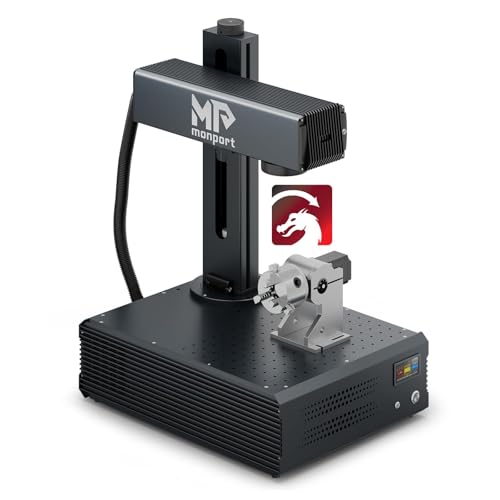
Monport’s autofocus model integrates an auto-focus system with a 3D feature set, delivering high-precision marks with a single-click focus (reported error under 1 mm). It uses a 6.9″ x 6.9″ work area and a tower-style enclosure with an 800 mm tower height. This machine is well-suited for users who want quick focus adjustments and simple setup, plus integration with lightweight materials. Best for: users prioritizing autofocus simplicity and stable markings. Caution: the smaller work area may limit larger parts.
- Best for: Autofocus-enabled, quick-start marking
- Why selected: Simplified workflow with integrated optics
- Limitation: Smaller work area compared to full-size 300×300 mm options
Oabduz 100W Fiber Laser Engraver for Jewelry and Metal

The Oabduz unit offers a 100W MOPA laser with JPT source and a SINO-SG 7110 galvanometer. It targets metal jewelry and color marking on stainless steel, with a 300×300 mm area and dedicated focus alignment features. Best for: jewelry and precision color marking on metal surfaces. Caution: ensure material finishes support the intended color marking depth for consistent results.
- Best for: Jewelry-grade metal marking and color highlights
- Why selected: Solid Galvo head and reliable JPT source
- Limitation: Color outcomes depend on material prep and anodization
Buying Guide: 100W Fiber Laser Engraver Essentials
What matters most: laser source, control, and optics
Choose a machine with a reputable laser source such as JPT MOPA M7 or similar, a reliable control board, and a high-quality galvanometer. These elements impact engraving depth, speed, and consistency across batches.
Work area and rotary options
Consider your typical part size. A 300×300 mm area is standard for small to mid-size parts, while the inclusion of an 80 mm rotary axis expands capabilities for cylindrical objects. If you frequently engrave bottles or rings, prioritize rotary support and stable fixturing.
Software compatibility and workflow
Look for compatibility with LightBurn or EZCAD, depending on your current design workflow. Auto-focus features can reduce setup time, but verify how the focus system behaves with your material thickness and coating.
Material compatibility and safety
Most 100W fiber laser engravers handle carbon steel, aluminum, stainless steel, brass, copper, gold, and silver. Some nonmetals are usable (e.g., ABS, PVC, nylon) for limited marking. Confirm the recommended material range and any coatings that affect marking depth and color.
Warranty, service, and support
Assess the availability of service and spare parts in the United States, especially for high-powered systems. Quick spare parts access and local support shorten downtime between runs.
Cost versus value
Higher power and advanced features add upfront cost but reduce processing time and improve throughput. Evaluate total cost of ownership, including power consumption, maintenance, and the need for specialized ventilation or safety measures.
Frequently Asked Questions
- What is a 100W fiber laser engraver best used for?
Primarily for metal marking, deep engraving, and color marking on stainless steel and other metals. It works well for jewelry, parts branding, and small-batch production.
- Do I need a rotary axis with a 100W laser?
A rotary axis is highly beneficial for cylindrical items like bottles, rings, and pipes. If you plan cylindrical engraving, choose a model with an axial rotary option or upgradeable accessories.
- Is autofocus necessary for metal engraving?
Autofocus can improve accuracy and reduce manual setup time, especially for varying material thickness. It is not strictly required but is helpful for high-volume or diverse workpieces.
- Which software works best with these machines?
LightBurn is widely used and compatible with many 100W fiber lasers. EZCAD is another common choice, particularly for users with established workflows. Confirm compatibility before purchase.
- What maintenance does a 100W fiber laser require?
Regular checks include laser tube or source health, optical lens cleanliness, and galvanometer alignment. Follow the manufacturer’s maintenance schedule to sustain engraving quality.
- Can these machines color-mark on metal?
Color marking is possible on some stainless steel and coated surfaces, depending on material properties and laser parameters. Expect some materials to require pre-treatment for best color results.