Answering the search for versatile 5 axis CNC capability, this guide selects five machines that either include a true 5th axis rotary table or expand 3/4 axis functionality with add-on rotation. These picks suit hobbyists, small shops, and professional makers who need multi-axis precision for complex parts, prototyping, and advanced engraving. Each product is evaluated for who it’s best for and why it stands out, with practical cautions where applicable.
Product Comparison at a Glance
- CNCTOPBAOS Rotation 5th Axis Rotary Table – Best for true 5th axis work and precision in a compact form
- Carvera Air Desktop CNC Machine with 4th Axis – Best for desktop multisurface work and beginner-to-intermediate users
- Genmitsu Cubiko CNC Router Machine – Best for plug-and-play usability and automatic Z probing
- FoxAlien XE-Ultra 8080 CNC Router – Best for large-format projects and strong frame rigidity
- Twotrees TTC450 Ultra CNC Router – Best for large work areas with robust all-metal construction
CNCTOPBAOS Rotation 5th Axis Rotary Table

The CNCTOPBAOS Rotary Table adds a true 5th axis to compatible CNC setups. It features two Nema23 waterproof stepper motors, a 50:1 speed-reducing gearbox for the 4th A Axis and 5th C Axis, and a compact footprint. Best for users seeking reliable division and indexing capabilities in a compact module. The water-resistant motor design supports safer operation in varied environments. A practical limitation is that this component requires integration with an existing CNC controller and compatible hardware to realize full 5-axis work, so it’s best for builders with a configured system.
Carvera Air Desktop CNC Machine with Makera CAM (4th Axis option)
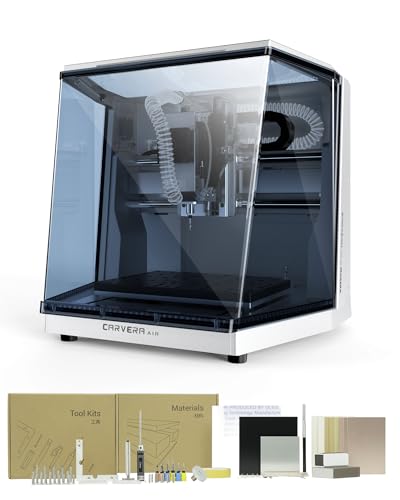
The Carvera Air is a compact, enclosed desktop CNC with a quick tool changer and auto probing. The 4th axis option broadens capabilities to cylindrical work, parts with rotation, and more complex 3D shapes. It’s best for hobbyists and small workshops needing multi-axis versatility without a full-size machine. A consideration is that it remains a desktop device, which may limit size and power for very large projects.
Genmitsu Cubiko CNC Router Machine
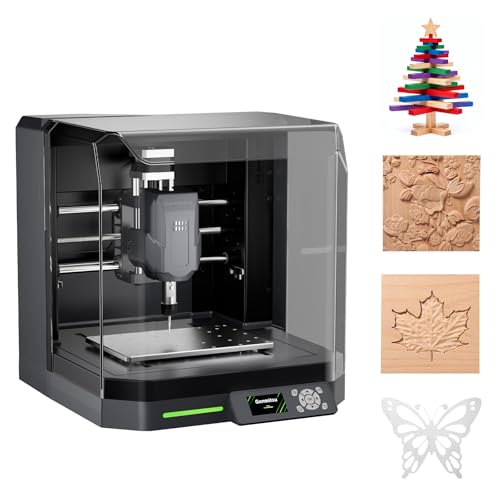
The Genmitsu Cubiko offers plug-and-play operation with automatic Z probing and smart surface adjustment. It’s ideal for beginners and makers who want reliable, straightforward setup with software compatibility (Genmitsu App, Fusion 360, Easel, Candle, Carveco). While not a true 5th axis, its automatic height and surface adjustments improve accuracy for multi-material projects and provide a solid foundation for expanding into multi-axis work with add-ons.
FoxAlien XE-Ultra 8080 CNC Router

The FoxAlien XE-Ultra 8080 provides a large workspace (33x33x4.72 inches) with closed-loop, high-torque motors and a sturdy aluminum frame. It’s well-suited for ambitious projects in wood, aluminum, acrylic, carbon fiber, and more. The machine’s strength lies in rigidity and speed capabilities, making it a strong choice for makers pursuing bigger builds. A potential limitation is the size and weight, which require adequate workspace and transport considerations.
Twotrees TTC450 Ultra CNC Router

The Twotrees TTC450 offers a large 465x465mm work area and a 500W spindle, with a robust all-metal chassis and high-precision lead screws. Its 3-axis configuration supports detailed engraving and cutting across wood, acrylic, aluminum, and plastics, with strong stability for longer runs. It’s best for users who need a big, capable desktop footprint and don’t require an integrated rotary axis but want room to scale up to larger parts.
Buying Guide: How to Choose a Multi-Axis CNC Setup
- Purpose and scale: Are you aiming for true 5-axis work or versatile 3-4 axis with optional rotary? Choose a base that matches your intended projects and available workspace.
- Axis integration: For true 5-axis capability, confirm compatibility with a rotary table, control software, and machine bed geometry. Consider how easy it is to add or upgrade components.
- Rigidity and materials: Large projects benefit from heavy frames and precision rails. All-metal frames and ball screws support heavy material cuts with reduced vibration.
- Software ecosystem: Look for CAM and control software that integrates with your workflow (Fusion 360, Easel, Carveco, etc.). Check for auto-probing and height adjustments to improve accuracy.
- Tooling and spindle options: Spindle power and tool-change speed affect throughput. Quick tool changers save time on multi-bit tasks but verify compatibility with your spindle size and collets.
- Safety and enclosure: Enclosures reduce noise and contain debris, which matters for home workshops and shared spaces.
- Support and documentation: Clear manuals, tutorials, and firmware updates help long-term reliability and expansion.
FAQ
- What is a true 5-axis CNC machine? A true 5-axis CNC machine uses five programmable axes, including rotary axes, enabling simultaneous movement for complex geometry. Some modules provide 5th-axis rotation via a rotary table that attaches to a 3- or 4-axis base.
- Do I need a large workspace for multi-axis work? Not always. Some compact desktop models provide 4th or 5th axis options, while larger projects may require bigger, all-metal frames and longer travel.
- Is auto probing essential for accurate milling? Auto probing helps measure material height and plane variation, improving setup speed and accuracy, especially on uneven surfaces.
- Can I upgrade from 3-axis to 5-axis later? Some systems support adding rotary axes or 4th/5th axis modules, but compatibility depends on the base machine, controller, and software.
- What materials can these machines work with? Most support soft materials like wood and plastics well; metals require more rigid builds, higher spindle power, and cooling. Always verify material compatibility for your chosen model.
- Is an enclosure necessary? Enclosures reduce noise and protect users, particularly in home workshops. They also contain chips and dust during milling operations.