Looking for a 4×8 wood CNC machine that can handle large panels, batch production, or signage? This guide highlights five top options well suited for serious woodworkers, makers, and small shops. Each pick offers strong rigidity, ample work area, and features that support precise carving on wood, with some models extending to metals and composites. Whether you’re building furniture parts, signs, or art panels, these machines balance capability with practical usability for both hobbyists and semi-professional users.
Summary of selected products:
| Product | Brand | Best For | Work Area |
|---|---|---|---|
| Genmitsu PROVerXL 4X4 CNC Milling Machine | Genmitsu | Mass production and large panels | ~4′ x 4′ |
| Twotrees TTC450 Pro All-Metal CNC Router | Twotrees | Professional engraving and large panels | ~18.1″ square |
| M2 CNC Engraving Machine Kit (Maslow-style) | Maker Made | Wall-mounted space-saving cutting | Up to 4×8 ft working area |
| FoxAlien Masuter Pro 3-Axis CNC Router | FoxAlien | Beginner to intermediate with upgrade path | 2D/3D carving on wood |
| FoxAlien XE-PRO 3-Axis CNC Router | FoxAlien | Industrial-capable desktop/bench setup | Compact footprint with robust rails |
Genmitsu PROVerXL 4X4 CNC Router Machine

The PROVerXL 4X4 expands to a 1300mm x 1300mm (4′ x 4′) work area, enabling processing of standard 4′ x 8′ sheets via indexing. Best for shops needing batch processing or large panels, it emphasizes stability with Φ20mm ball screws and dual X-axis rails. An optional dual Z-axis setup supports multi-spindle configurations for metals and other materials. The design prioritizes rigidity and accuracy for consistent cuts across large projects.
Best for: Medium-to-large production runs and sign shops that require a stable large-area router. Choose this if you routinely work with full 4′ x 8′ sheets and need scalable Z-axis options.
Limitations: Spindle and extra Z-axis components are sold separately, so full multi-spindle capability requires additional purchases.
Twotrees TTC450 Pro All-Metal CNC Router

The TTC450 Pro features an all-metal frame, a capacitive 3.5″ touch screen, and upgrade-ready ports for 4th-axis rotation, laser modules, and a large spindle controller. Its 18.1″ square work area (460 x 460 x 80 mm Z-height) supports large panels and multi-layer work with high-precision Z-axis movements (0.0025 mm). It uses GRBL open-source control, compatible with common CAD/CAM workflows and operating systems.
Best for: Makers seeking a compact yet capable all-metal machine with future upgrade potential and broad software compatibility.
Limitations: The machine emphasizes expansion options; users should verify compatible spindles and extensions before purchasing add-ons.
M2 CNC Engraving Machine Kit (Maslow-Style)
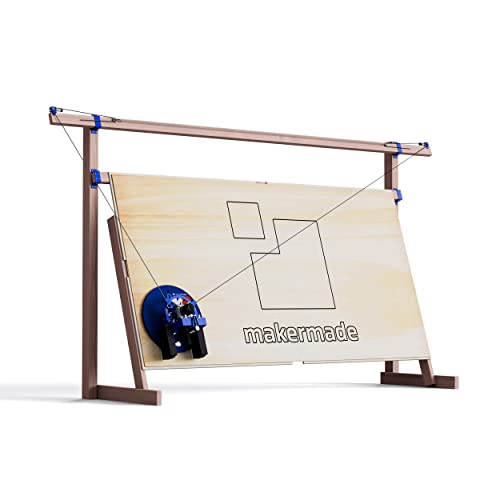
The M2 is a wall-mounted 3-axis CNC kit offering up to a 4′ x 8′ working area with an upright design to maximize space efficiency. It’s designed to work with standard router bits and supports various materials, including wood, metal, and plastic. The kit emphasizes a modular build with a dust collection port, lead screw Z-axis, laser-cut mounting brackets, and a GRBL-based Makerverse software suite for control.
Best for: Small workshops or makers with limited floor space who still want a large working area and modular expansion.
Limitations: The router itself is not included, and compatible mounting routers must be sourced separately. Open-source software may require setup time for first-time users.
FoxAlien Masuter Pro 3-Axis CNC Router

The Masuter Pro uses an all-metal frame with a robust linear rail Z-axis for stable engraving and carving on wood, acrylic, and more. It includes a dust-resistant controller with accessible emergency stop and home buttons for safety. Two spindle clamps (52mm and 65mm) support various spindle options, offering upgrade paths for more demanding projects.
Best for: Beginners and hobbyists who want a sturdy, upgrade-friendly machine with good value for wood and lightweight materials.
Limitations: Requires attention to compatible spindles and clamps when planning upgrades; some users may want a larger bed for bigger panels.
FoxAlien XE-PRO 3-Axis CNC Router

The XE-PRO features NEMA23 closed-loop motors and a 1204 ball screw-driven XYZ axis system, enhancing precision and speed. It supports upgrading to linear rails and is designed to be turned into an industrial-grade home machine by swapping XY axis for rails. A robust dual-rail system and rigid construction improve cut quality and repeatability for wood and aluminum.
Best for: Users needing higher speeds and smoother performance with upgrade potential from a compact footprint.
Limitations: Involves a more complex setup for those new to CNC; upgrading to rails or higher-power spindles may require additional parts.
Buying Guide
What size and work area do you truly need?
Consider the typical material sheet sizes you use. A 4′ x 4′ or larger work area simplifies batch work and reduces sheet handling time. If you only occasionally work with full panels, a smaller footprint with robust expansion options may be more practical.
Rigid construction and motion system
Look for machines with ball screws, linear rails, or heavy-duty Z-axis components. These features improve precision, surface finish, and repeatability across long runs, especially on larger panels.
Upgrade paths and flexibility
Assess whether the model supports additional spindles, dual Z-axes, or rail upgrades. The ability to adapt to metals or deeper cuts can extend the machine’s usefulness beyond wood.
Software and ecosystem
Check compatibility with common CAM tools (Fusion 360, Easel, Carveco Maker, GRBL-based software). Open-source ecosystems can offer ongoing updates and community support for troubleshooting and project ideas.
Safety and user-friendliness
Consider features like dust management, emergency stop, limit switches, and clear control interfaces. A user-friendly setup reduces learning curves and improves safety during long engraving sessions.
Budget and total cost of ownership
Initial price is only part of the picture. Factor in additional spindles, upgrade kits, spoil boards, dust collection, and necessary routers or bits. A model with scalable options can save money over time.
Does size fit your workspace?
For benchtop or small shop environments, compact or wall-mounted designs may be preferable. Larger 4′ x 4′ or 4′ x 8′ systems demand more floor space and dedicated extraction.
Quick comparison at a glance
- Best for large-format production: Genmitsu PROVerXL 4X4
- Best for expansion and metal-ready paths: Twotrees TTC450 Pro
- Best space-saving large area: M2 Wall-Mounted CNC
- Best starter with growth: FoxAlien Masuter Pro
- Best upgradeable industrial option: FoxAlien XE-PRO
FAQ
- What is the typical working area I should expect for a 4×8 wood CNC machine?
Answer: Many models target 4′ x 8′ sheets via indexing or wall-mounted setups, while some offer 18″ to 24″ square work areas with expansion options for larger panels. - Is a dual Z-axis necessary for most woodworking projects?
Answer: Not always. Dual Z-axis is advantageous for multi-spindle setups and specialized tasks, but a single Z-axis with a reliable spindle often suffices for standard wood carving and sign making. - Can these machines engrave metals as well as wood?
Answer: Some models support metal via compatible spindles and robust rigid frames, but performance varies. Check spindle power, rigidity, and tool paths for metal workability. - What software should I learn to operate these machines?
Answer: Common options include Fusion 360, Easel, Carveco Maker, and GRBL-based controllers. Open-source ecosystems are helpful for ongoing updates. - Which model is best for beginners with future upgrades?
Answer: FoxAlien Masuter Pro offers a solid entry point with upgrade paths, while M2 provides space-efficient expansion for wall-mounted setups. - Do these machines require special rooms or downdraft dust systems?
Answer: A dedicated, ventilated space with dust extraction improves air quality and tool longevity; many setups include dust ports and compatible collectors.