Find 50W fiber laser engravers that balance speed, precision, and versatility for metal and jewelry marking. This guide highlights five options well-suited for professional marking, small businesses, or hobbyists expanding into industrial-grade engraving. Each product is evaluated for best-use scenarios, with clear pros and a practical caution to help you pick the right machine.
| Product | Engraving Area | Best For |
|---|---|---|
| GWEIKE G2 Max 50W | 150 x 150 mm | Deep engraving and high-detail metal work |
| OMTech 50W LightBurn | 5.9″ x 5.9″ | All-metal builds with reliable accuracy |
| SFX US Stock 50W | 175 x 175 mm | Wide material variety and easy LightBurn workflow |
| ComMarker B4 50W | 110 x 110 mm / 200 x 200 mm | Desktop-to-handheld versatility |
| BLUETIMES 50W | 70–300 x 70–300 mm (adjustable) | Flexible field lenses for various jobs |
GWEIKE G2 Max 50W Fiber Laser Engraver

The GWEIKE G2 Max uses a 50W 1064 nm fiber laser and a high-speed galvanometer to achieve engraving speeds up to 15000 mm/s with 0.001 mm accuracy. It supports deep engraving and metal cutting, plus HD 8K engraving resolution. Best for professionals needing precise, high-detail results on metal substrates, including jewelry. Caution: larger workpieces require a suitable fixture to handle depth and focus consistently.
OMTech 50W Fiber Laser Marking Machine With LightBurn

OMTech’s all-metal 50W unit emphasizes a compact footprint and user-friendly operation. It features a 5.9″ x 5.9″ work area, a 0.01 mm spot and up to 10000 mm/s engraving speed. A red dot indicator assists with focus, and the system supports LightBurn, making it a strong choice for shops prioritizing reliability and ease of integration with existing software. Best for smaller parts and consistent color-ready marking. Caution: field depth is optimized for metals; some nonmetal marking may require adjustment.
SFX US Stock 50W Fiber Laser Engraver
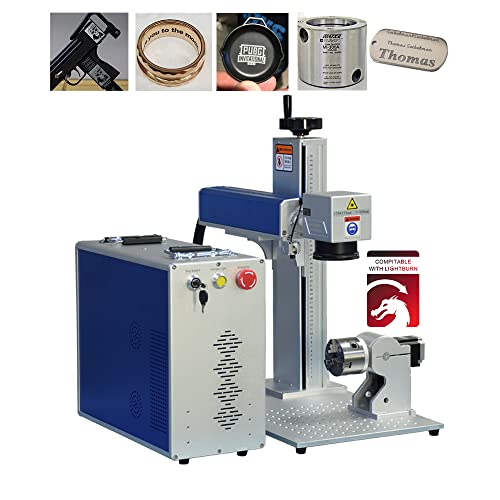
The SFX 50W model uses a 50W JPT-based laser with a 175 x 175 mm marking area and a Dia. 80 mm rotating head option. It is designed to work with LightBurn and includes a rotary accessory for round objects. Best for marking jewelry, aluminum, steel, and other metals with moderate to high throughput. Caution: class II laser rating means proper eye protection and enclosure are essential during use.
ComMarker B4 50W Fiber Laser Engraver

The ComMarker B4 blends desktop and handheld capabilities with 2 lenses (110×110 mm and 200×200 mm) for flexible marking. It supports LightBurn and EzCad2, with safety features like an emergency switch and automatic lifting. Best for jewelry and metal marking where portability and multi-angle marking are important. Caution: heavier, larger engravings may require a stable workstation to maintain accuracy.
BLUETIMES 50W Fiber Laser Engraver

BLUETIMES offers adaptable field lens options (from 70×70 mm to 300×300 mm) and supports EzCad2 and Lightburn Core Edition. It marks at speeds up to 7000 mm/s with 0.01 mm repeat precision and supports multi-material engraving on metals and select plastics. Best for professional-grade versatility across different job types. Caution: larger engraving areas may require careful setup to avoid edge distortion.
Buying Guide
- What should you consider when choosing a 50W fiber laser engraver?
- Engraving area and optics: larger areas enable bigger parts but may increase footprint and cost.
- Software and compatibility: LightBurn, EzCad2, and native interfaces affect workflow.
- Material compatibility: metals (aluminum, stainless steel, titanium) and some plastics; consider whether color engraving or 3D/Deep engraving is needed.
- Speed vs. precision: higher mm/s speeds improve throughput but ensure optical accuracy remains within your tolerance.
- Safety and setup: enclosure, eye protection, and proper ventilation are essential for home and workshop use.
Frequently Asked Questions
- Q: Are 50W fiber lasers suitable for jewelry marking?A: Yes, many 50W systems provide deep engraving, high-detail resolution, and compatibility with jewelry-grade substrates.
- Q: What software should I use with these machines?A: Most models support LightBurn, EzCad2, or both; choose based on your current design workflow and file compatibility.
- Q: How important is engraving area size?A: It determines what size parts you can mark in a single pass; larger areas improve throughput for bigger items.
- Q: Is a rotary axis necessary for rings and bracelets?A: A rotary accessory enables precise cylindrical marking, expanding the range of possible projects.
- Q: What safety precautions are essential?A: Use proper eye protection, enclosure or shielding, and ensure adequate ventilation for fumes and dust.
- Q: Do these machines require extensive setup?